 Timebird
A time tracker for Moneybird that lives in your Mac's menu bar.
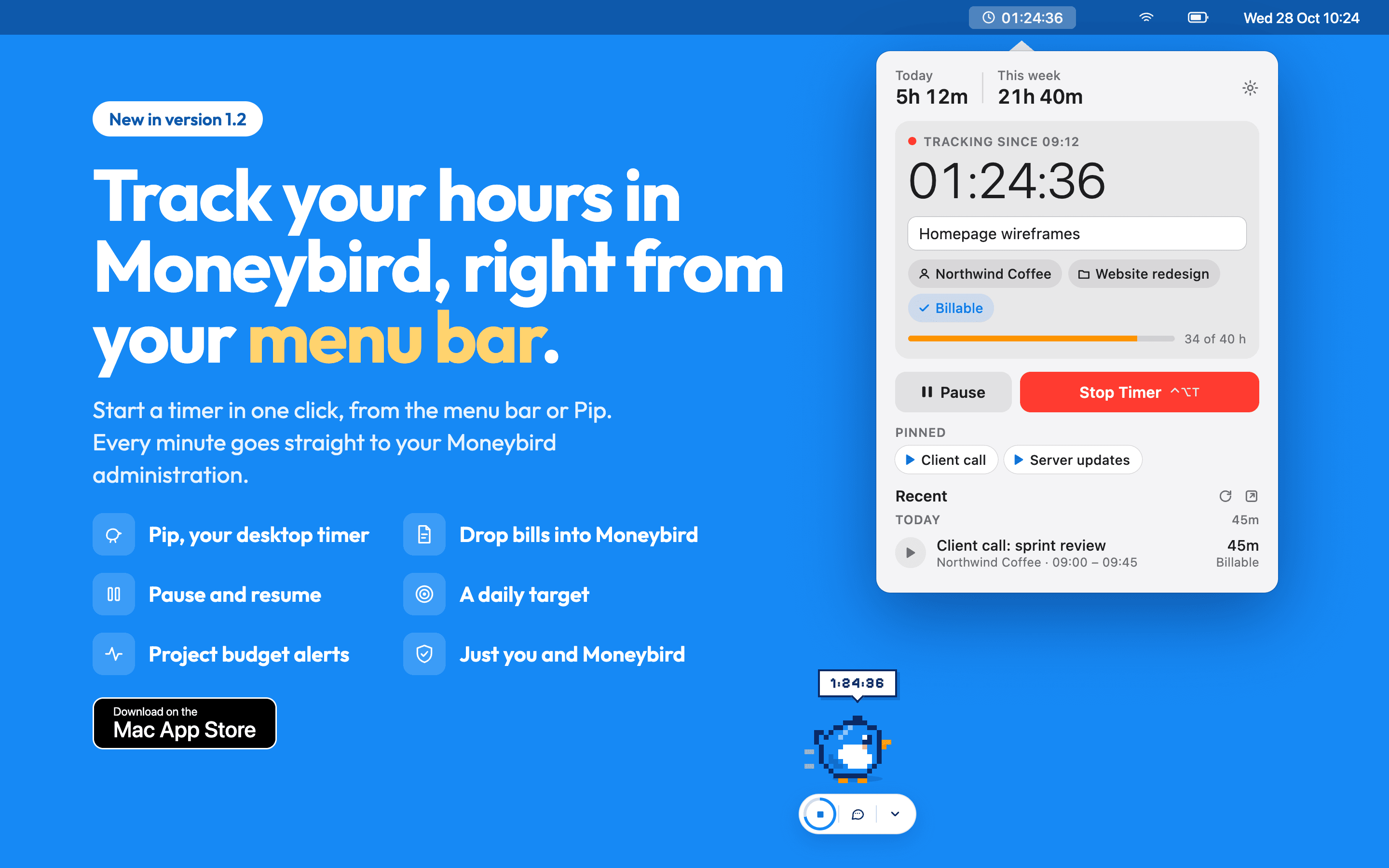
Click Timebird in your menu bar, pick a client and a project, and the timer starts. Stop it and the hours are already in Moneybird. Nothing to copy over at the end of the month.
Free. Needs macOS 13.5 or later and a Moneybird account (sign up for free if you don't have one).

What it does
- Timer
- Start, pause and stop from the menu bar or with a keyboard shortcut. Pick a client and project, and mark the time billable.
- Sync
- Each timer is a Moneybird time entry. Start one in Moneybird on the web and Timebird picks it up.
- Budgets
- A budget bar for each project, and unbilled hours for each client.
- Away
- Step away from your Mac and Timebird asks what to do with that time. Forget a timer and it nudges you.
- Receipts
- Drop a receipt on Pip, the bird on your desktop, and it lands in your Moneybird inbox.
- Offline
- Keeps tracking without internet and sends everything when you're back online.
- Privacy
- No Timebird server, no account, no analytics. Your hours go from your Mac to Moneybird and nowhere else.
Frequently asked questions
How do I track time in Moneybird on a Mac?
Download Timebird from the Mac App Store, sign in with your Moneybird account and start a timer from the menu bar. When you stop it, your hours are saved as a time entry in Moneybird, on the client and project you picked.
Is Timebird free?
Yes, Timebird is free on the Mac App Store. You need a Moneybird account to save your hours.
Does Timebird work with Moneybird's own timer?
Yes. Timebird uses Moneybird's timers, so a timer you start in Moneybird on the web shows up in Timebird, and the other way around.
Is Timebird made by Moneybird?
No. Timebird is an independent app by Adam Kramer that connects to your own Moneybird account. You need a Moneybird account to use it.
Where are my hours stored?
Only in Moneybird. Timebird has no server and no account of its own: your hours go encrypted, straight from your Mac to Moneybird. No tracking, no analytics.
Can I try Timebird without a Moneybird account?
Yes. Timebird has a demo with sample data, no sign-in needed.
Can I use Timebird with more than one Moneybird administration?
Yes. If you work for more than one administration, you can switch between them in Timebird.
Which macOS version do I need?
Timebird runs on macOS 13.5 Ventura or later.
Something missing or broken?
Email a@adamkramer.dev. Feature requests are welcome too.
Changelog
1.2.0LatestNovember 2026 · 11 features, 2 fixes
Features
- Meet Pip: a little bird on your desktop that shows your running time and starts or stops a timer with one click. Prefer something quieter? Choose just the timer, without Pip.
- Pip asks what to do with time you were away, and checks in when a timer has been running for a long time.
- Drop a bill or receipt on Pip or the menu bar icon to send it straight to your Moneybird inbox.
- Daily hours target: a ring fills as you work, with a notification when you reach it.
- A reminder to start tracking on the days and time you choose, with your favourites one click away.
- Pause a timer and pick it up again later, from the popover, the menu or Pip.
- Create a new client or project right from the popover, without opening Moneybird.
- A cleaner popover: one field to start, with client, project, billable and start time as simple buttons underneath.
- Recent entries grouped by day with daily totals. Play any entry to pick it up again.
- Edit a recent entry right from the popover: change its description, client, project, times, paused time or billable without opening Moneybird.
- Clearer about privacy: Timebird has no server of its own, and your hours only travel between your Mac and Moneybird.
Fixes
- Timers under a minute aren't saved by accident, and Undo brings one back.
- Faster and lighter, with fewer requests to Moneybird and a short pause when Moneybird asks for one.
1.1.0October 2026 · 12 features, 2 fixes
Features
- Favourites: pin a description, client and project and start it with one click.
- Project budgets: see how much of a project's budget is used, with a notification at 80% and 100%.
- Timers run in Moneybird and stay in sync with the Moneybird web app.
- Today's and this week's totals in the popover.
- Unbilled hours per client in the right-click menu.
- A global keyboard shortcut opens Timebird or stops the running timer.
- A reminder when a timer has been running for a long time.
- Idle detection asks what to do with the time you were away.
- Keeps working offline and sends your changes when you're back online.
- Switch between Moneybird administrations.
- Sign in with Moneybird without leaving the app, or try the demo with sample data.
- Redesigned popover, Preferences and sign-in screen.
Fixes
- Invoiced entries are locked, so they can't be changed by accident.
- A running timer survives quitting and restarting your Mac.
1.0September 2025 · First release
Features
- First release on the Mac App Store: start and stop timers from the menu bar that save straight to Moneybird.